
Influence Case with Thermo-Flow™: Support Hub
Influence Case with Thermo-Flow™: Support Hub
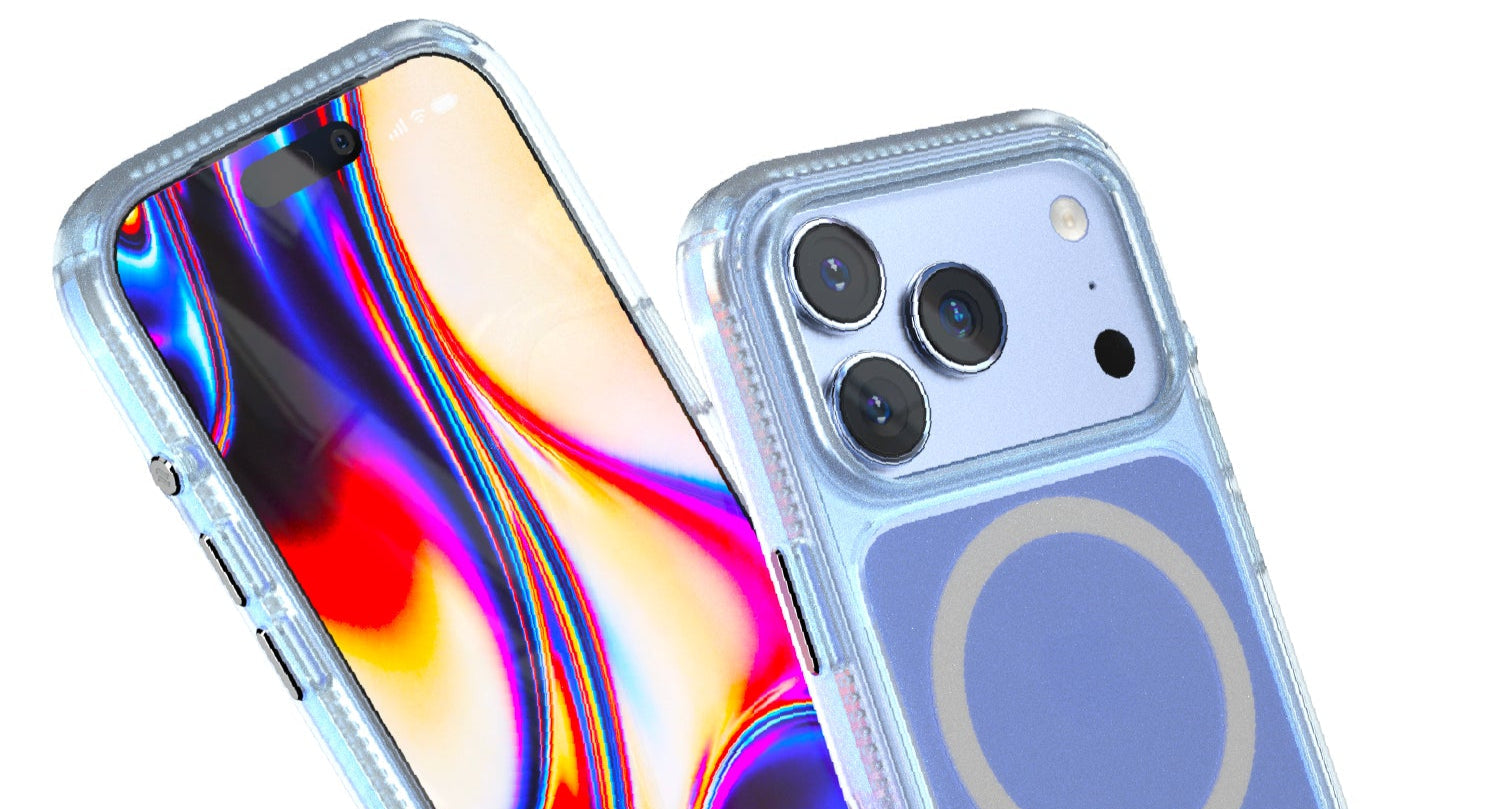
Catalyst Influence Case for iPhone 17 Pro & iPhone 17 Pro Max Owner's Guide
Welcome to the Catalyst family! Your new Influence case is a precision-engineered piece of gear designed to protect your iPhone through every adventure. Following these simple steps will ensure a perfect fit and help you keep your case performing like new for years to come.
🧭 Quick Navigation
Jump to any section or Chat Now with AI Support.
🧹 Step 1: Prepare Your Device
- 🧽 Clean thoroughly: Thoroughly clean your device's screen and body with a 70% isopropyl alcohol wipe or a microfiber cloth dabbed in 70% isopropyl alcohol (also known as isopropanol). This removes fingerprints, oils, and dust.
- 🔍 Detail cleaning: For hard-to-reach areas like speaker grilles, mute switch, and charging ports, use a dry Q-tip dipped in isopropyl alcohol or a soft-bristled brush to gently clear any debris.
💡 FAQ: Why use 70% isopropyl alcohol?
- It's the most common available alcohol in pharmacies and stores.
- When cleaning electronics, always use a high concentration of isopropyl alcohol to ensure it evaporates quickly and leaves no harmful residues.
- If you're using it as a disinfectant, 70% isopropyl alcohol is more effective than 90% because the higher water content allows for longer contact time with microorganisms, which is necessary to penetrate cell walls and effectively kill bacteria.
- It is compatible with the nano-coatings on your device.
📿 Step 2: Attach Your Lanyard (Highly Recommended)
- ⏰ Do it first: It is much easier to attach the included wrist lanyard (or any other Crux System accessory) before you install your phone.
- 🧷 Pro-Tip: To easily thread the lanyard cord, unwind a paperclip to create a small hook. Use the hook to pull the cord through the attachment point, then loop the lanyard through itself to secure it.
- 🔗 Attach all accessories: Attach all lanyard attachments that you wish to the case before you install the device.
📱 Step 3: Install Your Device
- 🎯 Insert Volume-Side First: Always insert the side of your device with the volume buttons first.
- ↙️ Align and Press: Gently seat that side into the case, ensuring the buttons align correctly.
- 🔒 Lock It In: Firmly press down on the opposite side and around all four corners. You will hear and feel a distinct "snap" as the device locks securely into the case's frame. Run your finger along the entire edge to ensure it is perfectly seated.
🧽 Part 2: Long-Term Care & Performance
Your case is built to last. A little care will keep it looking and performing its best.
🏗️ Understanding Your Case's Advanced Construction
Your case features a unique dual-layer design. A rigid, crystal-clear polycarbonate (PC) backplate is co-molded with a flexible, shock-absorbing thermoplastic polyurethane (TPU) bumper. This gives you the best of both worlds: a rigid structure to resist impacts and a soft, grippy bumper to absorb shock.
🌟 Safe Cleaning Instructions
- 🧼 Regular cleaning: Clean your case as needed with a soft cloth, mild soap, and water.
- 🦠 Disinfectant wipes: You can also use most EPA-approved disinfectant wipes (like 70% isopropyl alcohol).
- 💧 Rinse after disinfecting: If you use a chemical cleaner, we recommend a quick rinse with water afterwards to remove any residue.
- 🚫 Avoid abrasives: Never use rough sponges or harsh scrubbing pads, as they can create micro-scratches.
🔧 For Everyday Cleaning (Removing Dirt, Dust, Fingerprints)
- 📱 Remove your phone: For a thorough cleaning, always remove your phone from the case first.
- 🧼 Use mild soap and water: Wash the case with a soft cloth or sponge using simple dish soap and lukewarm water. This will gently lift away oils, dirt, and grime.
- 🪥 Clean the crevices: For hard-to-reach areas like the button cutouts or charging port, use a soft-bristled toothbrush to gently scrub away any stubborn debris.
- 💨 Rinse and dry thoroughly: Rinse the case completely with clean water. Pat it dry with a soft, lint-free towel and let it air dry completely before reassembling.
🦠 For Disinfecting (Killing Germs and Bacteria)
- 🧽 First, clean the case: Disinfectants work best on a surface free of dirt and oils. Follow the "Everyday Cleaning" steps above first.
- 🧴 Use an isopropyl alcohol wipe: Use a wipe pre-saturated with 70% isopropyl alcohol. This is highly effective and safe for the case materials.
- 🔄 Wipe all surfaces: Gently wipe down all surfaces of the case—inside and out.
- 💨 Let it air dry: The alcohol will evaporate quickly. No need to rinse.
⚠️ Important Safety Note:
Never use harsh, abrasive chemicals or scrubbing pads. Avoid bleach, solvents, or cleaners containing acetone, as these can permanently damage the materials. Stick to mild soap or 70% isopropyl alcohol.
🔄 A Note on Long-Term Wear & Thermo-Flow™ Vents
Over years of use, the flexible TPU bumper can begin to separate from the rigid PC backplate. Please be assured that even if this occurs, the case's structural integrity and drop-proof protection remain fully intact.
These cases feature Thermo-Flow™ vents at the corners to prevent heat buildup when charging. These vents may need to be cleared of dust periodically. Remove the case and use a Q-tip, soft-bristled brush, or can of compressed air to clean the vents.
⚠️ Part 3: Important Considerations
To ensure longevity and optimal performance of your Catalyst Influence Case, please keep the following in mind:
☀️ Minimize UV & Sun Exposure
Just like your own skin, the case materials can be affected by prolonged, intense UV light. To prevent premature yellowing and keep the materials supple, avoid leaving your case in direct, hot sunlight for extended periods (e.g., on a car dashboard).
🌡️ Avoid Extreme Temperatures
Rapid and extreme temperature changes can cause the different materials in the case to expand and contract at different rates. Avoid leaving your case in places like a hot car in the summer or a freezing environment for long durations.
🧴 Steer Clear of Harsh Chemicals
The TPU bumper is incredibly durable, but certain chemicals can cause it to discolor or degrade over time. Try to prevent prolonged contact with substances like:
- Sunscreens (especially those with high concentrations of active ingredients)
- Oils (e.g., essential oils, certain lotions)
- Solvents and adhesive removers (like Goo Gone™)
- Mosquito repellents containing DEET
🆘 If Exposed to Chemicals:
Remove the case and wash it with soap and water, then use a microfiber cloth to dry it. Then use a 70% isopropyl alcohol wipe to remove oils & fingerprints. It will evaporate and not leave a residue. Avoid flexing the case when it's off the device.
📤 To Remove the Case:
Pop it out at one of the bottom corners, run your finger along the edge, and pop off the next closest corner at the bottom. Then you can remove the case.
❓ Part 4: Troubleshooting & FAQs
If you encounter any issues or have further questions, consult this section.
🟡 My case looks yellow. Is this normal?
Over time, clear cases made from TPU (thermoplastic polyurethane) can exhibit a slight yellowing due to UV exposure and natural aging. This is a common characteristic of the material and does not affect the protective qualities of the case. The most common cause of discoloration is often staining from oils, harsh chemicals, or dirt, not just UV yellowing.
Prevention: Avoid prolonged contact with sunscreens, makeup, dark denim dye, and oils. Clean regularly and minimize intense, direct sun exposure.
🔘 My buttons feel stiff or unresponsive.
Ensure the case is properly installed and your iPhone is seated correctly. Sometimes a slight misalignment can affect button responsiveness. Check for any debris or dust around the buttons. Use a soft brush or compressed air to clean the area.
Solution: If the issue persists, remove your phone, clean the case thoroughly, and reinstall it, ensuring a snug fit.
🛡️ Is the case compatible with all screen protectors?
Yes, the Catalyst Influence Case is designed to be compatible with the vast majority of screen protectors. However, for optimal fit and protection, we strongly recommend using a "case-friendly" screen protector that does not extend to the absolute edge of the glass. This prevents interference with the case's secure, shock-absorbing lip.
🔌 How do I clean the charging port?
Use a dry, soft-bristled brush (like a clean toothbrush or an interdental brush) to gently remove any lint or debris from the charging port. Avoid using metal objects or excessive force, as this can damage the port.
Tip: For stubborn grime, a Q-tip lightly dampened with 70% isopropyl alcohol can be used, but ensure the port is completely dry before reinserting phone.
🔋 Can I use wireless charging with the case on?
Yes, the Catalyst Influence Case is fully compatible with wireless charging (Qi and MagSafe). The case is designed to allow for efficient power transfer without requiring removal. The Thermo-Flow™ vents actually help dissipate heat generated during wireless charging, which is better for your battery.
📱 When would the waterproof case for iPhone 17 Pro and Pro Max be available?
We currently do not have plans to release waterproof cases for the iPhone 17 Pro and iPhone 17 Pro Max. Please check our current catalog for waterproof cases compatible with other iPhone models, or contact us if you have questions about device compatibility..
❓ Where can I find more support or contact customer service?
For additional support, troubleshooting, or to contact our customer service team, please visit our main support page. You can also reach us directly via email at cs@catalystcase.com or by phone during business hours. We're here to help!
Link: catalystcase.com/pages/support Email: cs@catalystcase.com
🌡️ A. Thermo-Flow™ Cooling FAQs
Questions about heat, ventilation, and thermal performance
🤔 My iPhone 17 Pro Max feels warm while charging—is the case working?
Yes, this is normal. Some warmth during MagSafe charging or intensive use is expected. The Thermo-Flow™ vents allow excess heat to escape rather than trapping it. If your iPhone was hotter in a previous case, you should notice improvement.
Pro Tip: Point a small fan at the vents during gaming or video rendering for enhanced cooling.
🧹 How do I clean the Thermo-Flow™ corner vents?
Remove your iPhone, then use a soft-bristled brush, dry Q-tip, or compressed air to gently clear the four corner vents. Avoid using water in the vents. Reinstall your iPhone when done.
Maintenance: Check vents every few months, especially in dusty environments.
🌡️ About Thermo-Flow™ Vents
Heat is the enemy of performance and battery life. Our innovative Thermo-Flow™ vents create a passive convection system that allows hot air to escape, helping your iPhone stay cooler during intensive tasks like gaming, video recording, or MagSafe charging.
It's a simple, silent feature that helps maintain peak performance and preserve your battery's long-term health.
🧲 B. MagSafe & Wireless Charging FAQs
Questions about magnetic accessories and charging
🟢 Can I use any MagSafe charger with this case?
Yes, all MagSafe and Qi wireless chargers work perfectly. The embedded neodymium magnets provide a strong, secure connection. You should feel a confident "snap" when your charger attaches.
Also works with: MagSafe wallets, car mounts, battery packs, and stands.
⚠️ My MagSafe connection feels weak—what should I check?
Connection issues are usually caused by installation or debris: (1) Remove and reinstall the case, ensuring all corners snap; (2) Clean case back and charger surface; (3) Check for debris between case and phone; (4) Verify that you are using an Apple-certified MagSafe charger.
Note: The magnets are permanently embedded—they cannot lose strength.
📱 C. Installation & Fit FAQs
Questions about proper installation and case fit
✅ How do I know if my case is properly installed?
A properly installed case will: (1) Snap audibly at all four corners; (2) Have no gaps; (3) Allow responsive button clicks; (4) Align perfectly with charging port; (5) Show Camera Control flush with glass.
If corners feel loose: Remove and reinstall from volume button side.
📤 What's the best way to remove my iPhone from the case?
To safely remove: (1) Pop out one bottom corner by gently flexing the case edge; (2) Run your finger along the bottom to release the second corner; (3) Lift phone out from the bottom. Avoid prying from top or sides.
Important: Don't flex the empty case excessively—reinstall promptly.
📷 D. Camera Control FAQs
Questions about the capacitive Camera Control button
🤔 The Camera Control feels different through the case—is this normal?
Yes, this is expected. The case uses capacitive touch pass-through with 9H scratch-resistant glass. It should feel smooth when swiping and register taps instantly with zero lag.
Tip: Use the pad of your finger, not your nail.
⚠️ My Camera Control isn't responding—how do I troubleshoot?
If not responding: (1) Clean glass surface with dry microfiber cloth; (2) Ensure finger is dry; (3) Check case installation for gaps; (4) Restart iPhone; (5) Test with case removed to verify phone button works.
Still not working? Contact support@catalystcase.com
🔊 F. Audio & Phone Calls FAQs
Questions about True Sound Acoustics™
🤔 My calls sound different with this case—is something wrong?
Calls should sound better! True Sound Acoustics redirects audio forward and isolates speakers from microphones. This means clearer voice quality for callers and louder speakerphone for you.
If muffled: Check front speaker ports aren't blocked; clean with soft brush.
🔗 G. Lanyard & Accessories FAQs
Questions about the included lanyard and Crux System
🎯 How do I attach the included lanyard securely?
To attach: (1) Locate any of the four corner attachment points; (2) Thread lanyard cord through—use an unwound paperclip as a hook if needed; (3) Loop lanyard through itself to secure; (4) Tug firmly to verify.
Strength: Pull-tested to 10kg (22 lbs). Attachment points are structural.
🎒 Can I attach other accessories to the lanyard points?
Yes! All four attachment points are compatible with Catalyst Crux System: shoulder straps, crossbody straps, ring stands, and carabiners. Each connects the same way as the included lanyard.
Shop Accessories: Crux System Collection
🧼 H. Care & Cleaning FAQs
Maintaining your case appearance
🟡 My case looks yellowed or discolored—what happened?
Common causes: (1) Contact with oils (sunscreen, lotions, makeup); (2) Harsh chemicals; (3) Dark denim dye transfer; (4) Prolonged UV exposure. Yellowing doesn't affect protection—it's cosmetic.
Prevention: Clean regularly, avoid prolonged sun, rinse after oil/chemical contact.
🧴 What's the best way to clean my case?
For routine cleaning: (1) Remove iPhone; (2) Wipe with damp cloth or mild soap solution; (3) Use soft brush for ports and vents; (4) Dry completely before reinstalling. Avoid harsh chemicals, bleach, or abrasives.
Frequency: Every 1-2 weeks, or immediately after oil/sweat exposure.
🔧 I. Troubleshooting & Warranty FAQs
General troubleshooting and warranty information
💧 Does this case make my iPhone waterproof?
No. The Influence case with Thermo-Flow is drop-proof, not waterproof. It doesn't affect your iPhone's built-in IP68 water resistance. Avoid submerging even with the case on.
Need waterproof? See our Waterproof Case Collection.
📋 Is my case covered under warranty?
Yes, all Catalyst cases include a 12-month warranty covering manufacturing defects—buttons, attachment points, structural integrity under normal use. Not covered: normal wear, cosmetic changes (yellowing), or misuse damage.
Claims: Email support@catalystcase.com with order number and photos.
📚 Where can I learn more about the technology in this case?
For detailed engineering explanations of Thermo-Flow™, True Sound Acoustics, MagSafe integration, and all Catalyst technologies, visit our comprehensive Catalyst Technology page.
Topics: Drop protection, thermal management, audio engineering, and more.
Still Need Help? 🤝
Our AI-powered support is available 24/7 for personalized assistance.
Or explore the engineering behind your case.